Premium Monthly
NT$150
Auto-renews monthly
Premium monthly subscription

Focus · App Blocker
Want to open it? Wait 30 minutes — the urge rarely survives
Free download · see plansHow many times have you picked up your phone to look something up and lost an hour? You have tried Screen Time and Focus modes, but the problem was never too few reminders; it is that skipping them is too easy. Lock In gives you a lock you cannot casually skip: to open a blocked app you first wait out a cooling-off period, and an impulse rarely survives those minutes. The in-app interface is currently Traditional Chinese only.
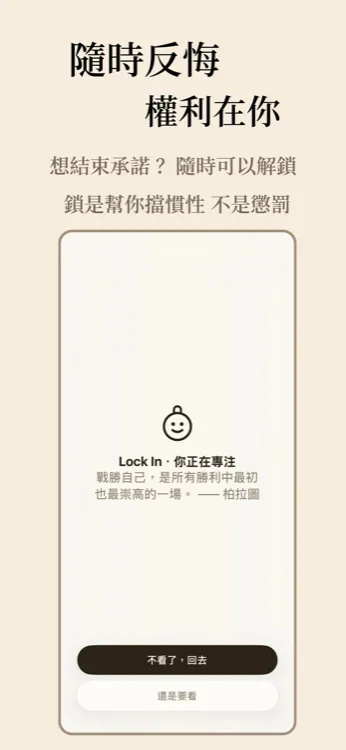
Swipe for more
For people who want fewer phone distractions, whose Pomodoro timers fade after a few days, or who have tried Screen Time and Focus modes but keep tapping past the reminder. If you want something harder to bypass, that stretches your focus and leaves the choice to you instead of relying on willpower alone, Lock In is built for you.
Reminders you skip with one tap, a resolve to cut back that lasts less than a day, a Pomodoro that ends and sends you straight back to scrolling? Lock In has you set a lock period first. Opening a blocked app brings up a quote that stops you, and unlocking means waiting out a cooling-off period. Skipping is no longer effortless, yet you can always change your mind.
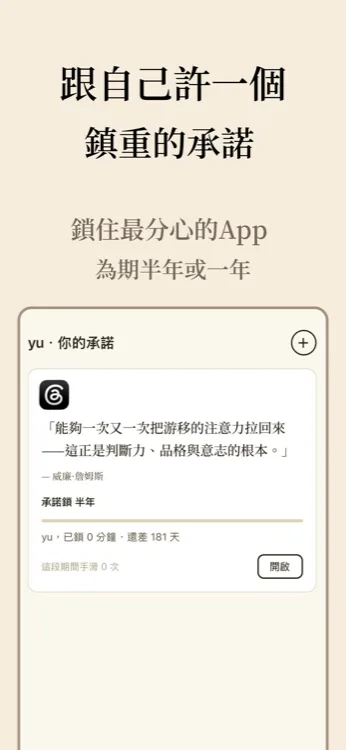
Set it once and let the system hold the line. Choose one week, six months, one year or your own number of days, and make a clear commitment about the app that distracts you most. Once it starts, Lock In stays with you for the whole period, unlike a 25-minute Pomodoro that ends and has to be restarted tomorrow.
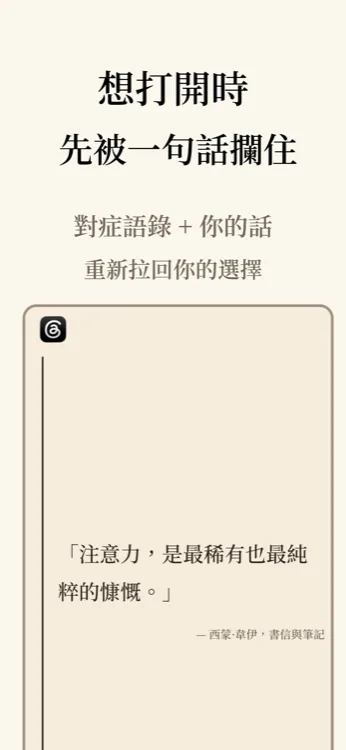
When you try to open a locked app, a quote appears first, along with the sentence you wrote to yourself when you set the lock. The quotes range from calm life wisdom to fiery anime lines, so you may see a different one each time. The goal is to make you pause for one more second before you slip.
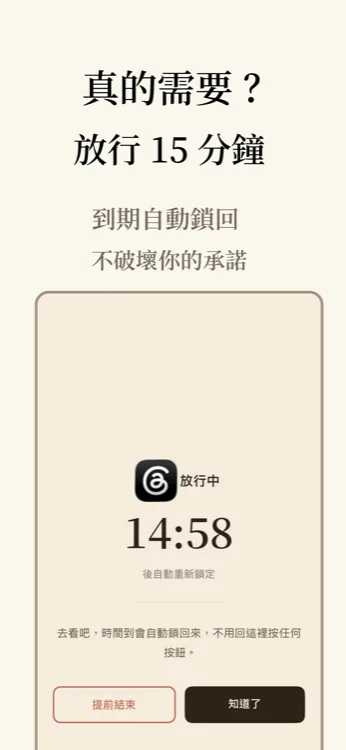
If you truly need the app briefly, the soft lock lets you allow it for 15 minutes, then locks again automatically when the countdown ends. The paid hard lock makes you wait out a 15, 30 or 60 minute cooling-off period before it opens, and ending or deleting a commitment goes through the same wait. There is no back door.
Each time you hold off, or tap a blocked app by accident, Lock In keeps a record with no punishment and no lecture. The stats page turns every urge you stopped into "time reclaimed," and each week it makes a shareable report card so you can see your own progress.
There is no sign-up and no login, and the app does not connect to a server. Which apps you locked and the lock periods you set stay on this phone, with no upload, no tracking and no reading of your usage content. The App Store listing says it is only for iPhone, because it is a tool designed for iPhone.
The app is free to download. Premium plans: iOS: Premium Monthly NT$150, Premium Yearly NT$888, Premium One-Time Purchase NT$1990. There is currently no Android version.
| Plan | Price | Purchase type | Includes |
|---|---|---|---|
| Premium Monthly | NT$150 | Auto-renews monthly | Premium monthly subscription |
| Premium Yearly | NT$888 | Auto-renews yearly | Premium yearly subscription |
| Premium One-Time Purchase | NT$1990 | One-time purchase | Unlocks Premium |
NT$150
Auto-renews monthly
Premium monthly subscription
NT$888
Auto-renews yearly
Premium yearly subscription
NT$1990
One-time purchase
Unlocks Premium
Content last updated:
A Pomodoro timer is a short timer of a few dozen minutes that ends when the time is up. Lock In sets a long lock period, from one week to one year, on a single app, and once the commitment starts the system helps you hold it for the whole stretch.
Yes, you stay in control. The soft lock can be allowed for 15 minutes and re-locks itself. The hard lock and deleting a commitment require waiting out a 15, 30 or 60 minute cooling-off period. It is not completely locked with no way in.
Not yet. The in-app interface is currently in Traditional Chinese only. The app is for iPhone and the lock features do not depend on language, but menus and quotes are in Traditional Chinese.
No. Lock In needs no sign-up or login and does not connect to a server. Your lock settings and records stay on your phone, with no upload and no tracking of your usage content.
The app is free to download. Premium plans: iOS: Premium Monthly NT$150, Premium Yearly NT$888, Premium One-Time Purchase NT$1990.
Not at the moment. Lock In is only available for iPhone (iOS 16 or later), and its App Store page says it is for iPhone only. An Android version is planned.
The stats page converts every urge you resist into "time reclaimed." The same team also makes learning apps such as Sushi JLPT and Pizza TOEIC, if you want to spend some of that time practicing vocabulary.
Rather than relying on willpower, add a pause before you open the app. A 2023 PNAS field experiment (the one sec app) with 280 people over six weeks found that when a short wait and an option to give up appeared before an app opened, about a third of attempts were abandoned and opens of the target apps fell by about 37%; this is a study of one specific app and may not apply to everyone. Steps: 1. Find the one or two apps that eat the most time. 2. Add friction before opening them. 3. Decide in advance what you will do with the time you save. Lock In intercepts you when you try to open a blocked app, and the hard lock makes you wait out a cooling-off period.
Partly; it depends on how you set it up. Apple's Screen Time can set app limits and downtime and require a passcode to change settings or extend time, but if only you know the passcode, you can still let yourself through. Try this: 1. Set limits for only the one or two most distracting apps. 2. Give the passcode to someone you trust. 3. When you hit the limit, put the phone down instead of extending. If you often let yourself through, combine it with Lock In: the soft lock allows 15 minutes and then re-locks, and the hard lock waits out a 15, 30 or 60 minute cooling-off period. You can use both together.
Related articles.
Lock In · Free download
Download and try it